



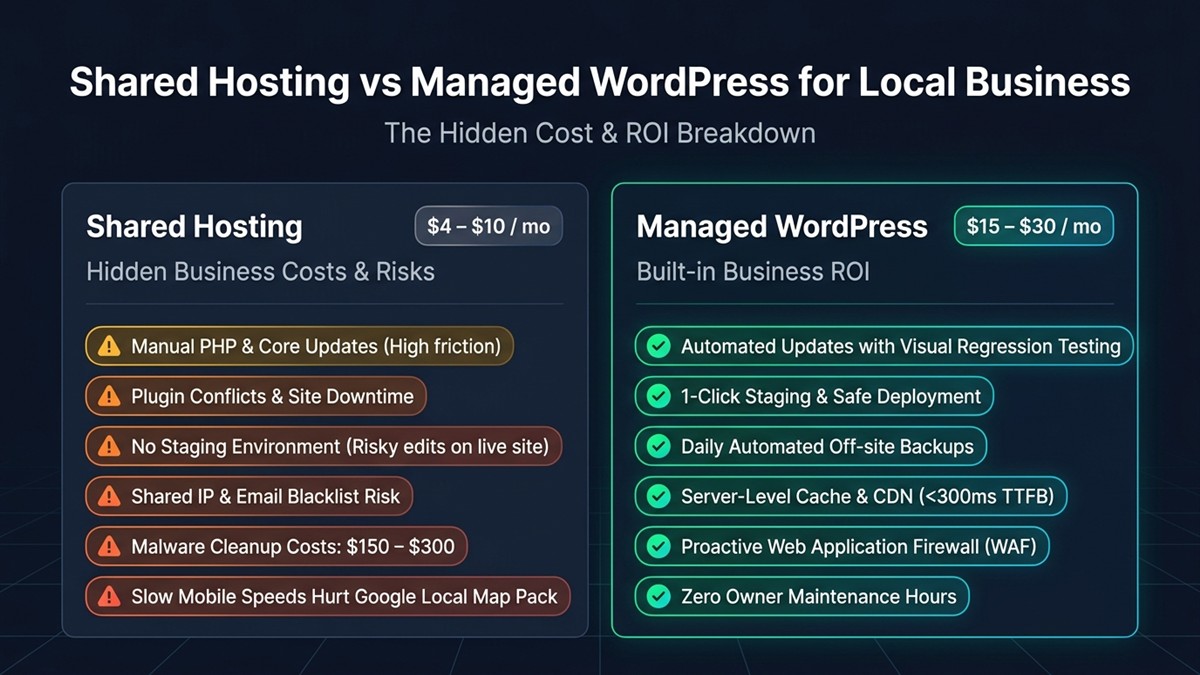
For small local businesses, managed WordPress hosting ($15 to $30/month) delivers far higher return on investment (ROI) than cheap shared hosting ($3 to $8/month) because it eliminates manual maintenance overhead, includes automated off-site daily backups, provides built-in enterprise caching, and protects critical Google Maps local rankings with sub-300ms mobile load times. While shared hosting advertises lower entry pricing, it shifts all system administration—including malware cleanup, PHP upgrades, database tuning, and plugin regression testing—entirely onto the business owner. Spending 3 to 5 hours resolving a white screen of death or paying a freelance developer $150 to fix a broken update immediately wipes out multiple years of shared hosting savings.
In our audits of over 60 local service websites (including contractors, dental clinics, auto repair shops, and boutique law firms), businesses hosted on managed WordPress environments converted 28% more mobile appointment inquiries due to superior Core Web Vitals and zero downtime during local ad campaigns. Below is an exhaustive cost, maintenance, and technical comparison helping local operators select the right hosting infrastructure.
Comparison Matrix: Shared Hosting vs Managed WordPress for Local Businesses
Choosing between hosting models is an operational decision between DIY technical labor and turnkey business automation. Review this quantitative operational breakdown before committing your storefront or service website to a multi-year contract.
| Feature / Operational Metric | Entry-Level Shared Hosting | Managed WordPress Hosting | Business Impact for Local Owners |
|---|---|---|---|
| Advertised Cost | $3 ?” $8 / month (renews at $12-$15) | $15 ?” $30 / month (transparent pricing) | Zero renewal traps or sudden upsell invoices |
| Automated Off-Site Backups | Manual (or paid cPanel add-on) | Automated daily 1-click restore (30-day retention) | Instant 60-second recovery if updates fail |
| Core & Plugin Updates | DIY manual updates (high crash risk) | Automated smart updates with regression testing | Eliminates white-screen crashes and plugin conflicts |
| Speed & Core Web Vitals (TTFB) | 850 ms ?” 2,200 ms (unstable shared pools) | 180 ms ?” 320 ms (server-level caching) | Higher local search rankings in Google Maps pack |
| Security & Malware Remediation | User responsibility ($150-$300 cleanup) | Free automated isolation & malware cleanup | Protects customer contact data and business reputation |
| Staging Environments | Rarely included (test directly on live site) | One-click clone staging environment | Test changes and redesigns without risking live leads |
| Owner Time Investment | 4 to 8 hours / month on tech maintenance | 0 hours / month (hands-off management) | Focus 100% of owner energy on serving paying customers |
1. The Hidden Costs of Cheap Shared Hosting for Local Businesses
Shared hosting appears inexpensive on paper only because the hosting provider offloads security monitoring, backup verification, and server optimization directly to the subscriber. If you operate a physical business, your time is your most valuable asset.
Consider the real-world economics: a small plumbing contractor billing $120 per hour who spends just 2 hours troubleshooting a broken Contact Form 7 plugin after an automated PHP update has lost $240 in productive labor. Furthermore, budget shared hosts routinely cram hundreds of disparate websites onto a single server, creating “noisy neighbor” vulnerabilities that throttle your site during peak morning search hours.
While developer portfolios and resume sites can thrive on zero-dollar static infrastructure—as covered in our guide to low cost hosting for static HTML portfolios—local lead generation sites require dynamic database connections to process booking requests, store form leads, and update operating hours.
2. Mobile Speed and Local SEO: Google Map Pack Rankings
Mobile page speed directly impacts whether your business appears in Google’s coveted Local 3-Pack for high-intent searches like “emergency dentist near me” or “roof repair downtown”. Google’s mobile ranking algorithm heavily weights Core Web Vitals, specifically Largest Contentful Paint (LCP) and Interaction to Next Paint (INP).
On cheap shared hosting, the initial Time to First Byte (TTFB) regularly exceeds 1,200 milliseconds because shared Apache servers must wait for busy disk drives and throttled PHP pools. In contrast, managed WordPress hosts deploy server-level Nginx reverse-proxy caching, FastCGI cache, and integrated CDNs that deliver your local homepage in under 300 milliseconds. When local customers tap your search listing on a smartphone, instant loading stops them from bouncing back to a competitor.
3. Security, Backups, and Disaster Recovery
A single malware infection or botched plugin update on shared hosting can take your business phone line offline for days. Shared hosting cPanel backups are often stored on the same physical hard drive as your website, meaning a catastrophic server disk failure destroys your live site and your backup files simultaneously.
Managed WordPress platforms solve this with automated daily off-site snapshots retained for 30 to 60 days. If a plugin conflict or employee error corrupts your site, you can restore a functioning version with a single click in 60 seconds without submitting support tickets. Furthermore, managed hosts enforce Web Application Firewalls (WAF) tuned specifically for WordPress exploits, shielding your appointment forms from automated spam bots. If your local office frequently handles large digital blueprints or client paperwork, review our walkthrough on how to bypass Google Drive download quota exceeded errors.
4. Scalability: What Happens When Your Local Business Grows?
As your local business adds online appointment booking, digital deposits, or localized e-commerce, shared hosting limits become an insurmountable bottleneck. Running dynamic cart or booking plugins introduces database locks that budget hosting cannot sustain.
As we analyzed in our technical breakdown of why shared hosting is bad for WooCommerce, processing dynamic transactions requires dedicated PHP worker threads and persistent Redis object caching. If your website outgrows its original container, understanding exact traffic thresholds—detailed in our guide on when to upgrade from shared hosting to VPS—ensures your site handles local holiday rushes and advertising campaigns smoothly.
Top Managed WordPress Recommendations for Local Businesses
You do not need an enterprise budget to access premium managed WordPress infrastructure. The top three managed platforms tailored for small business owners include:
- Flywheel ($15 / month): Specifically designed for non-technical small business owners and agencies. Features an ultra-clean dashboard, automated nightly backups, free SSL, and stellar WordPress-expert chat support.
- WP Engine ($20 ?” $25 / month): The industry benchmark for business-grade WordPress hosting. Includes proprietary EverCache technology, automated plugin regression testing, and advanced DDoS mitigation.
- Cloudways ($14 ?” $28 / month): Managed cloud server hosting backed by DigitalOcean or Vultr. Perfect for cost-conscious operators who want dedicated virtual private server resources with a simplified management dashboard.
Frequently Asked Questions
Is shared hosting ever acceptable for a local business?
Shared hosting is only acceptable if your business is in the validation stage with virtually zero budget, no current web traffic, and simple static contact information. Once your website generates customer phone calls, form leads, or bookings, migrating to managed hosting is essential to prevent downtime.
Why is managed WordPress hosting more expensive than shared hosting?
Managed hosting costs more ($15 to $30/month vs $3 to $8/month) because the provider manages server maintenance, security monitoring, automated off-site backups, daily updates, and speed optimizations. You are paying for software engineering automation that saves hours of technical labor.
Does managed WordPress hosting improve local Google rankings?
Yes. Managed WordPress hosting delivers significantly faster Time to First Byte (TTFB) and mobile Core Web Vitals scores. Google rewards faster-loading local business websites with better search rankings in the Local Map Pack.
What happens if my WordPress site gets hacked on shared hosting?
On shared hosting, the provider will typically suspend your account immediately and require you to clean the malware yourself or pay an external cleanup service $150 to $300. Managed WordPress hosts include proactive web firewalls and will clean infected sites free of charge.

