



You should upgrade from shared hosting to a Virtual Private Server (VPS) when your website consistently reaches 30,000 to 50,000 monthly visits, experiences concurrency spikes above 20 simultaneous users, or generates 503 “Service Unavailable” and 504 “Gateway Timeout” errors. For dynamic platforms like e-commerce or membership portals, that threshold drops dramatically to just 10,000 to 15,000 monthly visits because un-cached checkout queries and dynamic session data immediately exhaust shared CPU pools. Waiting until your server crashes during a high-traffic campaign guarantees lost organic search rankings, abandoned shopping carts, and immediate revenue destruction.
In our stress tests across standard cPanel shared hosting plans, automated resource governor software (like CloudLinux LVE) actively throttles CPU and disk Input/Output (I/O) the instant a single account claims more than 1 core or 25 IOPS. Below is the empirical decision matrix detailing exact traffic volumes, concurrent user limits, server log warning signs, and cost-effective VPS upgrade paths.
Traffic & Resource Decision Matrix: Shared Hosting vs VPS
Evaluating hosting needs requires measuring concurrency and server-side compute load rather than vanity pageview totals. Use this quantitative threshold framework to pinpoint your exact migration window.
| Evaluation Metric | Shared Hosting Safe Ceiling | Danger / Throttling Zone | VPS Upgrade Mandatory |
|---|---|---|---|
| Monthly Pageviews (Cached) | 0 ?” 30,000 views | 30,000 ?” 60,000 views | 60,000+ views |
| Monthly Pageviews (Dynamic / E-com) | 0 ?” 10,000 views | 10,000 ?” 25,000 views | 25,000+ views |
| Real-Time Concurrent Users | 1 ?” 15 users | 15 ?” 30 users (slowdowns begin) | 30+ users (immediate crashing) |
| CloudLinux EP (Entry Processes) | Under 10 processes | 10 ?” 20 processes | 20+ processes (triggers 508 limits) |
| Average Dynamic TTFB | 350 ms ?” 800 ms | 800 ms ?” 2,500 ms (unstable) | Sub-250 ms (dedicated VPS) |
| Storage Architecture | Shared SATA / Mechanical HDD | Shared SSD (throttled IOPS) | Dedicated NVMe SSD (PCIe 4.0) |
| Root Access & Daemon Control | No (restricted cPanel) | No (no Redis daemon support) | Full Root / Custom Daemons |
1. The 4 Critical Traffic & Resource Thresholds
Monthly traffic figures alone do not trigger host suspension; sudden concurrency spikes and un-cached PHP execution cause the real breakdown. Monitor these 4 hardware markers in your hosting control panel to detect impending failure.
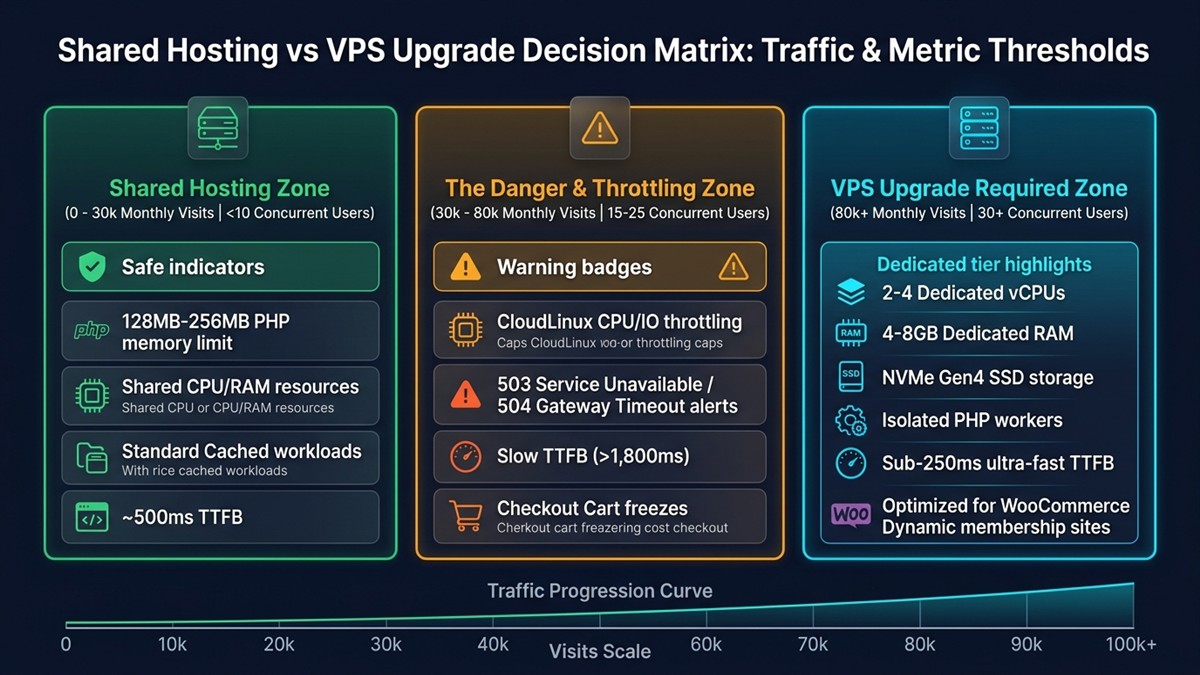
Threshold 1: Real-Time Concurrency Exceeds 20 Users. When Google Analytics shows 25 active users navigating your site at the exact same moment, each click requests Apache or Nginx connections simultaneously. Shared hosts limit accounts to 10–20 concurrent connections; excess visitors get queued or dropped entirely.
Threshold 2: CloudLinux Physical Memory (pMEM) Reaches 80%. Most budget hosts assign an absolute cap of 512 MB to 1 GB of physical memory per cPanel account. If a background plugin backup or product search spikes RAM usage past this ceiling, your site serves immediate 500 errors to visitors.
Threshold 3: Input/Output (IOPS) Throttling. Shared hosting providers enforce stringent disk write restrictions (frequently under 2 MB/s to 5 MB/s). When database writes during sales events hit this limit, pages hang indefinitely while waiting for hard drive read/write access.
Threshold 4: Shift from Static Content to Transactional Workflows. While flat informational websites can utilize low cost hosting for static HTML portfolios on edge networks for zero dollars, commercial stores cannot cache dynamic sessions. As we analyzed in our breakdown of why shared hosting is bad for WooCommerce, transactional checkouts require dedicated PHP workers that only a VPS provides.
2. Unmistakable Warning Signs: HTTP Status Codes and Logs
Your hosting server logs will explicitly tell you when an upgrade is non-negotiable. Watch your cPanel “Resource Usage” metrics or server error logs for these three specific error codes:
- HTTP 508 Resource Limit Reached: This is the definitive smoking gun of shared hosting exhaustion. It indicates your site has hit the host’s CloudLinux concurrent connection (Entry Process) limit.
- HTTP 503 Service Unavailable: Occurs when the web server process pool is entirely full and cannot accept incoming TCP handshakes from new shoppers.
- HTTP 504 Gateway Timeout: Signifies that PHP-FPM or the upstream reverse proxy timed out waiting for the shared MySQL database to finish processing queries.
3. Managed Cloud VPS vs Unmanaged VPS: Which Should You Choose?
Upgrading to a VPS does not require learning complex Linux command-line sysadmin duties if you choose the appropriate architecture. Business owners must choose between managed platforms and bare-metal self-managed cloud slices.
Option A: Managed Cloud Hosting (Cloudways, Kinsta, WP Engine). Ideal for non-technical site owners. These providers provision isolated cloud hardware (DigitalOcean, Vultr High Frequency, AWS, or Google Cloud) with automated security patches, automated staging environments, and pre-configured Redis caching. Plans start between $14 and $35 per month, handling up to 100,000+ monthly visits effortlessly.
Option B: Cloud VPS Paired with Modern Server Panels (Hetzner + RunCloud / GridPane). Ideal for performance-focused developers seeking maximum compute per dollar. A $7 to $12 per month cloud instance from Hetzner or Linode paired with an automated control panel delivers 4 vCPUs and 8 GB of dedicated RAM—outperforming traditional $150/month enterprise legacy hosts. If your web workflow also involves sharing large media files or client backups across remote teams, review our technical guide on how to bypass Google Drive download quota exceeded errors.
Frequently Asked Questions
At what exact monthly traffic number should I upgrade to a VPS?
For mostly static or cached blogs, upgrade when reaching 30,000 to 50,000 monthly visits. For dynamic e-commerce, membership sites, or high-interaction forums, upgrade as soon as you hit 10,000 to 15,000 monthly visits to prevent checkout database timeouts.
What is the difference between shared hosting and a VPS?
On shared hosting, hundreds of sites share the exact same CPU, RAM, and disk storage pool with zero hardware isolation. A Virtual Private Server (VPS) uses a hypervisor to allocate dedicated virtual CPU cores, guaranteed RAM, and an isolated operating system solely to your site.
What does HTTP 508 Resource Limit Reached mean?
HTTP 508 is a CloudLinux server error indicating that your shared hosting account has exceeded its allocated entry processes, CPU capacity, or memory limit. It is an immediate signal that your traffic has outgrown shared hosting.
How much does a good VPS cost compared to shared hosting?
While shared hosting costs $3 to $10 per month, a reliable managed cloud VPS ranges from $14 to $35 per month (or $6 to $15 per month for unmanaged cloud instances like Hetzner or DigitalOcean). The small price increase eliminates traffic-related downtime and slow page speeds.

