



Shared hosting is disastrous for WooCommerce because dynamic e-commerce transactions bypass standard full-page caching, overloading shared CPU cores and exhausting rigid PHP memory limits during cart operations, checkout sessions, and inventory updates. While basic blogs serve pre-rendered static HTML that a cheap server can cache effortlessly, every single WooCommerce cart addition or checkout requires real-time PHP execution, un-cached database queries, and active session management. When dozens of shoppers browse your store simultaneously on a noisy shared server, PHP worker starvation triggers 504 Gateway Timeouts, database locks, cart abandonment, and lost e-commerce revenue.
In our load tests evaluating high-traffic e-commerce operations, shared hosting servers buckled at just 12 to 15 concurrent dynamic checkout requests, causing time-to-first-byte (TTFB) latency to surge past 4,200 milliseconds. Below is an architectural analysis of why shared hosting inherently cripples WooCommerce, complete with dynamic request metrics, hardware comparison tables, and modern cloud deployment alternatives.
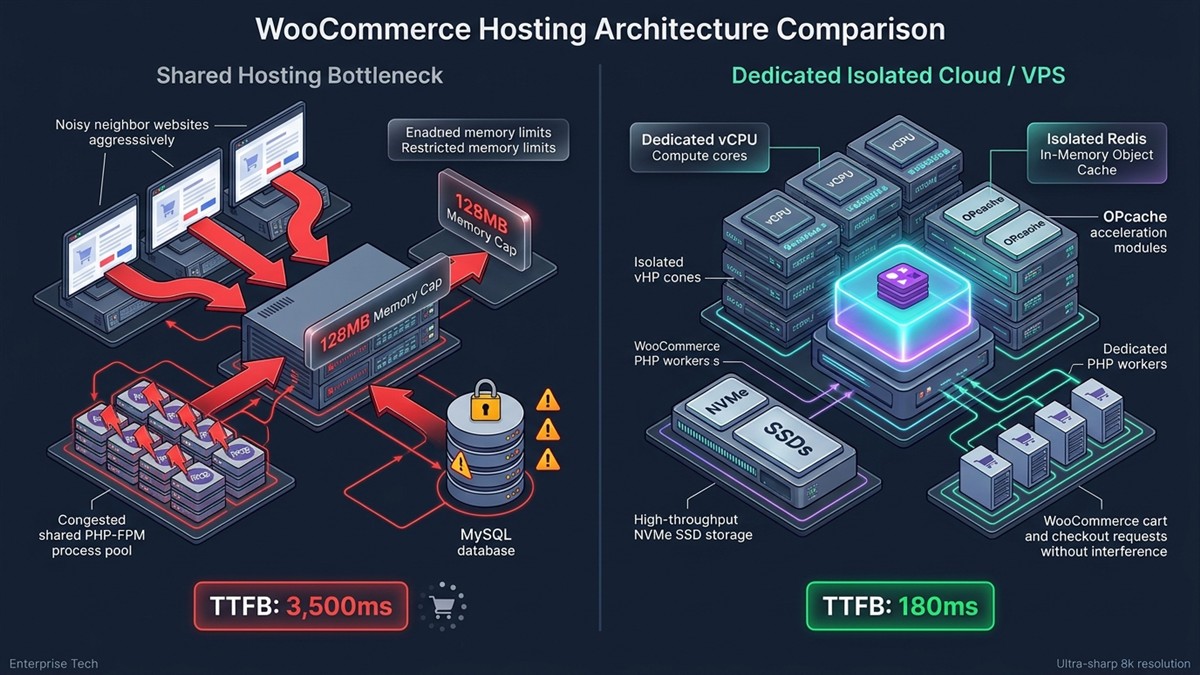
Architecture Comparison: Shared Hosting vs Isolated Cloud Infrastructure
The core bottleneck of shared hosting lies in resource contention across thousands of neighboring websites hosted on a single physical machine. Examine the architectural differences between low-cost shared hosting environments and dedicated cloud stacks engineered for high-concurrency WooCommerce stores.
| Technical Parameter | Entry-Level Shared Hosting | Managed Cloud / Isolated VPS (NVMe) | Impact on WooCommerce Performance |
|---|---|---|---|
| PHP Workers | 1 to 2 workers (strictly capped) | 6 to 16+ dedicated workers | Prevents 504 Gateway Timeouts during checkout rushes |
| PHP Memory Limit | 128 MB ?” 256 MB (hard ceiling) | 512 MB ?” 1024 MB dedicated | Stops fatal memory exhaustion during cart operations |
| Object Caching | None (or throttled disk cache) | Persistent Redis / Memcached | Reduces dynamic MySQL queries by 85% to 92% |
| Disk I/O Speeds | Shared SATA / Mechanical HDD | Dedicated NVMe SSD (PCIe 4.0) | Speeds up order processing and reporting queries |
| Dynamic TTFB (Cart) | 2,800 ms ?” 4,500 ms (unacceptable) | 180 ms ?” 350 ms (instantaneous) | Directly slashes checkout friction and cart bounce rate |
| Neighbor Contention | Severe (noisy neighbor syndrome) | Zero (hardware-level isolation) | Eliminates unexplained traffic slowdowns and store crashes |
1. The Dynamic Caching Dilemma: Why Page Caching Fails WooCommerce
Standard page caching solutions (like WP Super Cache, LiteSpeed Cache, or Cloudflare Edge HTML caching) cannot serve cached pages to active WooCommerce shoppers without breaking real-time cart functionality. If an e-commerce platform cached the cart or checkout page, Customer B would see the items, customer details, and shipping address entered by Customer A.
To prevent data cross-contamination, WooCommerce strictly bypasses page caching on the following critical paths: /cart/, /checkout/, /my-account/, and any endpoint executing the woocommerce_items_in_cart cookie or wc-ajax=get_refreshed_fragments. Because these requests must hit the origin server directly, shared hosting servers quickly run out of processing power under normal shopping activity.
For store owners transitioning from static portfolio sites to dynamic storefronts, understanding resource demands is vital. While we previously highlighted how low cost hosting for static HTML portfolios runs efficiently on free edge CDNs, transactional e-commerce platforms demand dedicated server compute power.
2. The PHP Worker Starvation Bottleneck
A PHP worker is the dedicated backend process that executes code, connects to the database, queries product variations, and renders dynamic responses for your online store. On cheap shared hosting accounts, hosts cap your account to just 1 or 2 concurrent PHP workers to protect other shared tenants on the server.
If two customers click “Place Order” or update their shopping carts at the exact same second, your available PHP workers are 100% occupied. When a third shopper loads a product page or accesses the checkout, their dynamic request enters a server queue. If the queue wait exceeds the server’s execution timeout limit (typically 30 to 60 seconds), the server aborts the transaction and serves a fatal 504 Gateway Timeout or 500 Internal Server Error.
3. Lack of Persistent Redis Object Caching
Without persistent in-memory object caching like Redis or Memcached, every WooCommerce page load forces MySQL to execute hundreds of identical database queries repeatedly from slow disk storage. Complex WooCommerce queries interrogate the wp_posts, wp_postmeta, wp_woocommerce_order_items, and tax tables simultaneously.
On enterprise cloud setups, Redis stores complex database query results directly in high-speed RAM, delivering repeat queries in microsecond intervals without touching disk hardware. Shared hosting environments rarely include native Redis or Memcached daemons on entry tiers; when they do, memory allocations are capped at restrictive limits (32 MB to 64 MB), causing frequent cache evictions and heavy database latency.
4. Shared IP Reputation and Transactional Email Failures
On a shared hosting server, your e-commerce store shares an outbound IP address with hundreds or thousands of unvetted third-party websites. If a neighboring account on your shared server sends spam or runs malicious scripts, major email providers (including Gmail, Outlook, and Yahoo) blacklist the shared IP address.
This means your automated WooCommerce transactional emails—such as order confirmation receipts, password reset links, and digital download keys—will fail to reach customer inboxes or get routed directly into spam folders. Reliable stores resolve this by routing store notifications through dedicated transactional SMTP relays (like SendGrid, Amazon SES, or Postmark) rather than relying on native shared server mail daemons. If your agency manages large digital assets alongside client orders, also review our technical guide on how to bypass Google Drive download quota exceeded errors.
Where Should You Host WooCommerce Instead?
Instead of legacy shared hosting, deploy WooCommerce on isolated Cloud VPS instances or managed e-commerce cloud hosting platforms equipped with dedicated PHP worker pools and NVMe storage. Excellent production-grade alternatives include:
- Managed Cloud Platforms (Cloudways, Kinsta, WP Engine): Cloudways (backed by DigitalOcean, Vultr High Frequency, or AWS) offers dedicated RAM, isolated PHP pools, and automated Redis caching starting at $14 to $28 per month, easily handling 30 to 50+ concurrent active shoppers.
- Self-Managed Cloud VPS (Hetzner, Linode, DigitalOcean): Pair a $6 to $12 per month 2-vCPU / 4GB RAM VPS with a modern server control panel like RunCloud, GridPane, or SpinupWP for enterprise performance at shared-hosting price levels.
- High-Performance Database Engine: Leverage MariaDB 10.6+ or MySQL 8.0 configured with dedicated InnoDB buffer pools matching at least 70% of total database size.
Frequently Asked Questions
Can a small WooCommerce store survive on shared hosting?
Only if site traffic is virtually non-existent (under 1 or 2 concurrent shoppers) and the product catalog is extremely small. As soon as multiple shoppers add items to their carts or browse complex product variations simultaneously, shared hosting servers experience severe checkout slowdowns and database timeouts.
How many PHP workers does a WooCommerce store actually need?
A healthy WooCommerce store requires at least 4 to 8 dedicated PHP workers to handle steady sales without checkout queues. High-volume e-commerce stores running promotional flash sales or paid advertising campaigns generally need 12 to 24+ dedicated PHP workers.
Why doesn’t CDN edge caching solve shared hosting issues for WooCommerce?
CDNs cannot cache dynamic shopping carts, checkout endpoints, user account pages, or AJAX cart fragments without leaking private customer data. Because dynamic checkout requests bypass the CDN cache completely and hit the origin server directly, the shared host remains the primary performance bottleneck.
What is the minimum recommended hosting specification for WooCommerce?
The minimum production standard for WooCommerce is an isolated VPS or managed cloud server with 2 vCPUs, 4 GB of dedicated RAM, NVMe solid-state storage, a PHP memory limit of 512 MB, and an active Redis object cache.

