



The internet you use every day hides a lot of structure. Cables, switches, and signal paths work quietly in the background. One system plays a big role in modern fiber internet. That system is the passive optical network, often shortened to PON.
People hear the term when talking about fiber broadband, but many don’t know what it really means. This guide explains it in plain language. We’ll walk through how a passive optical network works, how it fits into optical fiber communication, and how its architecture is set up in the real world.
No shortcuts. No heavy jargon. Just clear ideas that build step by step.
What a passive optical network is
A passive optical network is a fiber-based access network. It connects one service provider point to many users using shared fiber lines.
The word passive matters here.
Between the provider and the customer, there are no powered devices. No active electronics. Only passive components like splitters and fiber cables.
That design keeps the network simple and efficient.
Why it’s called passive
In networking, active devices need power. They amplify or regenerate signals.
A passive optical network avoids that in the field.
Once the signal leaves the provider’s equipment, it travels through:
- Fiber cables
- Optical splitters
No electricity is needed along the path. Power is required only at the two ends.
Why service providers use passive optical networks
Providers use PONs because they solve several problems at once.
They:
- Reduce maintenance costs
- Use fewer powered devices
- Support many users on one fiber
- Scale well in cities and suburbs
One fiber line can serve dozens of homes.
Passive optical network in optical fiber communication
In optical fiber communication, data moves as light pulses. Fiber can carry huge amounts of data over long distances with low signal loss.
A passive optical network takes advantage of that.
Instead of running a separate fiber to every home, a single fiber leaves the provider and then splits into many paths. Each user gets a portion of the signal.
This sharing model is what makes fiber broadband practical at scale.
Basic parts of a passive optical network
Every PON uses the same core components.
1. Optical Line Terminal (OLT)
This sits at the provider’s central office. It sends and receives data for all users on the network.
2. Optical Distribution Network (ODN)
This includes the fiber cables and passive splitters. No power. No electronics.
3. Optical Network Terminal (ONT)
This device sits at the customer location. It converts light signals into usable internet data.
Together, these parts form a complete path.
Passive optical network diagram explained
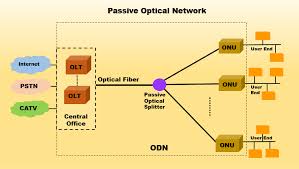
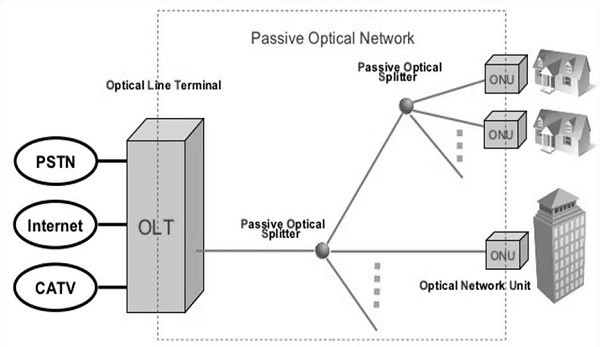
A passive optical network diagram usually shows a tree shape.
- One OLT at the top
- Fiber running outward
- One or more splitters
- Many ONTs at the ends
The diagram helps visualize how one signal branches out to many users.
Also read : – How to Become Best Friends on Snapchat?
How data moves downstream
Downstream traffic flows from the provider to users.
The OLT sends data as light signals.
Those signals pass through splitters.
Every ONT receives the same signal.
Each ONT reads only the data meant for it. The rest is ignored.
How data moves upstream
Upstream traffic moves from users back to the provider.
This part needs coordination.
Each ONT sends data in assigned time slots. This avoids collisions. The OLT controls the timing so users don’t talk over each other.
Why splitters are so important
Optical splitters divide light without electricity.
Common split ratios include:
- 1:8
- 1:16
- 1:32
- 1:64
Higher split ratios serve more users, but reduce signal strength. Engineers balance reach and performance carefully.
Passive optical network architecture
The passive optical network architecture follows a clear layout.
- Central office with OLT
- Feeder fiber leaving the building
- Passive splitter cabinets in the field
- Distribution fiber to homes
- ONT at each location
This layered design keeps expansion simple.
Why architecture planning matters
Poor planning causes:
- Weak signals
- Limited upgrade options
- Higher repair costs
Good architecture allows:
- Easy upgrades
- Future bandwidth growth
- Stable performance
That’s why PON design gets careful attention.
Common types of passive optical networks
Several PON standards exist.
APON and BPON
Early versions. Rare today.
GPON
Widely used. Supports high speeds for home internet.
XG-PON and XGS-PON
Newer standards. Higher capacity and better future support.
All follow the same passive principle.
Why PON works well for homes
Homes usually don’t need dedicated fiber paths. Usage peaks at different times.
A shared network works because:
- Not everyone streams at once
- Bandwidth is managed dynamically
- Fiber capacity is very high
This keeps costs down without hurting user experience.
PON vs active optical networks
An active optical network uses powered switches between provider and user.
Compared to that, PON offers:
- Lower energy use
- Fewer failure points
- Less field equipment
Active networks allow more control but cost more to run.
Distance limits in passive optical networks
A typical PON supports:
- Up to 20–40 km from OLT to ONT
Distance depends on:
- Split ratio
- Fiber quality
- Optical power budget
Designers calculate this carefully.
Security in passive optical networks
Since downstream data reaches all ONTs, encryption is critical.
Each ONT uses encryption keys so it can only read its own traffic. This keeps user data private.
Why fiber signal quality matters
Fiber quality affects:
- Speed
- Stability
- Error rates
Splices, bends, and connector quality all matter. Passive networks depend on clean optical paths.
Installation in real neighborhoods
In practice, PONs use:
- Underground ducts
- Pole-mounted cables
- Street cabinets
Splitters may sit in sealed enclosures. Once installed, they rarely need attention.
Maintenance advantages
Because there’s no powered equipment outside:
- Fewer failures occur
- Storm damage is easier to isolate
- Power outages don’t affect the fiber path
Only the OLT and ONT need electricity.
Why passive optical networks scale well
When demand grows:
- Providers upgrade OLT hardware
- ONTs get replaced
- Fiber and splitters stay the same
That saves time and money.
Role of passive optical networks in modern broadband
Most fiber-to-the-home services rely on PON technology.
It supports:
- High-speed internet
- IPTV
- Voice services
All over a single fiber line.
Passive optical network and future upgrades
Newer PON standards increase speed without changing the physical layout.
This means today’s networks can support tomorrow’s needs with minimal disruption.
Common misunderstandings
Some think passive means slow. That’s wrong.
Passive refers to equipment, not performance. Modern PONs deliver very high speeds.
Where PON is used beyond homes
PONs also serve:
- Office parks
- Campuses
- Hospitals
- Smart city systems
Anywhere shared fiber makes sense.
also read : – My Pasco Connect : Easy Guide for Students and Parents (Parent Portal, Login, Password, and More)
Why engineers prefer PON for access networks
Access networks connect end users. Cost, reliability, and scale matter most here.
PON meets all three goals.
FAQs
What is a passive optical network?
A fiber network that uses passive splitters instead of powered field equipment.
What does a passive optical network diagram show?
It shows how one fiber splits to serve many users.
How does a passive optical network work in optical fiber communication?
It sends data as light through shared fiber paths.
What is passive optical network architecture?
The layout of OLTs, fiber, splitters, and ONTs.
Is passive optical network secure?
Yes. Encryption ensures users only see their own data.
Final words
A passive optical network is simple by design. That simplicity is its strength. Fewer powered parts mean fewer failures. Shared fiber keeps costs reasonable. Careful architecture allows growth without constant rebuilding.
When people talk about fiber internet reliability, much of that credit goes to the quiet efficiency of passive optical networks. They work without drawing attention. And in networking, that’s usually a good sign.

