


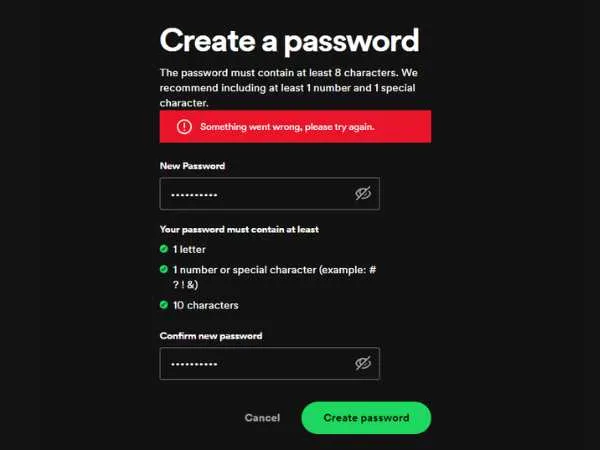
Ever been locked out of Spotify because you just couldn’t remember your password? Yeah, I’ve been there—and it’s not fun when all you want is your playlist on loop but the login screen won’t let you in. The good news? Changing or resetting your Spotify password isn’t rocket science. The tricky part is knowing which method to use: on phone, iPhone, desktop, or when the Spotify password reset email refuses to show up.
This guide covers everything you need: how to change your Spotify password on phone, iPhone, what to do if you forgot your Spotify password and username, and fixes for “Spotify password reset not working.”
Why You Should Change Your Spotify Password
Let’s be real—most of us recycle the same password across multiple apps. It’s convenient, but it’s also risky. Hackers love accounts like that. Spotify has millions of users, and leaked credentials are a common thing.
I’ll give you a personal example: one morning I logged in and saw a playlist named Reggaeton Party Night sitting on my account. The problem? I never made it. That’s when I realized—someone else had my login. Creepy, right? I changed my password immediately.
So, whether you’ve noticed suspicious playlists, got logged out without reason, or simply can’t remember your login, it’s a good idea to reset.
How To Change Spotify Password On Phone
Here’s the catch—Spotify doesn’t let you change your password directly in the app. Weird, I know. Instead, you need to use your browser (Chrome, Safari, etc.).
Steps:
- Open your browser on the phone.
- Go to spotify.com/account.
- Log in with your current details.
- Tap on Profile > Account > Change Password.
- Enter your current password once.
- Enter the new password twice for confirmation.
- Hit Set New Password.
And boom—you’re done. Quick tip: don’t just reuse your Gmail or Netflix password. Pick something new, or you’ll be back here again in no time.
How To Change Spotify Password On iPhone
If you’re an iPhone user, the steps are basically the same—but you’ll need Safari.
- Open Safari.
- Head over to spotify.com.
- Tap the menu (three lines in the top right).
- Log in to your account.
- Navigate to Account > Change Password.
- Fill in your current and new passwords.
- Save.
That’s it. Doesn’t matter if you’re on iPhone 11, 13, or 15—the process hasn’t changed.
How To Reset Spotify Password Without Email
This one trips up a lot of people. Maybe you don’t remember which email you used—or maybe you signed up with Facebook, Google, or Apple. If that’s the case, you technically don’t have a “Spotify password” to reset. Instead:
- Facebook users: reset your Facebook password. Then use Facebook login in Spotify.
- Google users: change your Google account password.
- Apple users: reset your Apple ID password.
After updating, just log back into Spotify with the same method. Done.
But what if you really don’t remember the email? Here’s a trick: search your inbox for “Spotify.” Almost everyone has at least one welcome email, subscription receipt, or notification sitting somewhere.
“I Forgot My Spotify Password And Username” – What To Do
Okay, so you forgot both? Relax, you’re not the first. Spotify usernames are often random strings of numbers (unless you picked a custom one), so don’t stress too much about that. Just focus on your email.
- Go to the Spotify reset page.
- Enter the email linked to your account.
- Click the reset link you receive.
If you’ve lost access to that email, your best bet is contacting Spotify support. Honestly, it’s a hassle, but there’s no magic shortcut here.
Spotify Password Reset Email – Not Arriving?
This happens more often than you think. You hit reset, wait for the email… and nothing. Frustrating.
Here’s what to try:
- Check spam/junk folders. Reset emails sometimes end up there.
- Wait at least 15 minutes. Don’t spam the reset button—it slows things down.
- Confirm your email address. Did you maybe use your work email or an old Gmail? I once typed mine wrong and sat refreshing like an idiot.
- Whitelist Spotify. Add no-reply@spotify.com to your contacts to make sure emails don’t get filtered.
Still nothing? Head over to Spotify Support Chat. They can confirm your account details and send a fresh reset link.
Spotify Password Reset Not Working – Quick Fixes
Sometimes the email arrives, but the link doesn’t work. Annoying, right? A few common reasons:
- Link expired. Most reset links only last 1 hour. If you clicked late, request a new one.
- Multiple reset requests. If you requested 3–4 times, only the last link will work. The older ones are useless.
- Browser issue. Try opening the link in incognito mode or another browser.
If all else fails, again, Spotify Support is your lifeline.
Extra Tips To Keep Your Spotify Account Safe
- Use a strong password. Mix numbers, caps, and symbols. No “password123.”
- Enable two-factor login if you’re using Facebook/Google login.
- Log out everywhere if you think someone else has access. Spotify has a button for that under account settings.
- Update your email security. If your email gets hacked, Spotify goes with it.
also read : – Spintel NBN Plans : Prices, Speeds, and Current Deals
Personal Experience (Quick Story)
I once logged in on my laptop at a friend’s place and forgot to log out. Next week, I was getting “Recently Played” songs from his workout playlist. Let’s just say my Spotify thought I suddenly loved hardcore EDM at 6 am. Funny? Yes. But also a good reminder—log out on shared devices and keep your password safe.
FAQs – Spotify Password
Q1. How to change Spotify password on phone without email?
👉 You can’t. You’ll need access to the registered email or linked login (Facebook/Google/Apple).
Q2. Can I change my Spotify password in the app?
👉 Nope. You need to use a browser—either on phone or desktop.
Q3. What if my Spotify reset email doesn’t arrive?
👉 Check spam, confirm the right email, wait 15 minutes, then try again.
Q4. How to fix “Spotify password reset not working”?
👉 Request a new link, open in incognito mode, or contact Spotify Support.
Q5. I forgot my Spotify password and username. What should I do?
👉 Focus on the email. Search your inbox for Spotify messages. If locked out completely, contact support.
Q6. How to change Spotify password on iPhone?
👉 Open Safari > spotify.com > Account > Change Password. Simple as that.
Final Words
Changing your Spotify password isn’t complicated—it’s just not obvious since you can’t do it inside the app. Whether you’re on phone, iPhone, or dealing with the dreaded “Spotify password reset email not working” error, the solutions are straightforward once you know them.
So, next time you forget, don’t panic. A few taps, a reset link, and you’re back to your playlists. And hey—set something unique this time, because honestly, no one wants to get locked out right when the mood for music hits.

