


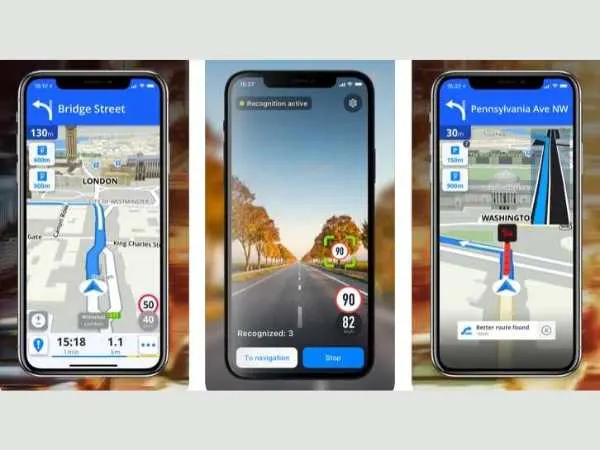
In today’s digital era, GPS navigation apps play a great role in our daily life. From finding a restaurant to drive another city, it guides us on the roads and also suggests the shortest route for the destination. In this article, we will discuss the best GPS apps for iPhones. In this blog we are going to tell you the Best GPS Apps For IPhone, so read this full blog to get the complete information.
GPS Navigation Apps
GPS Navigation apps offer Maps, Search, turn-by-turn navigation, and off-road navigation. There are two types of navigation apps for iOS: Those that download maps and those that retrieve maps on the fly. Some GPS apps save mobile data and battery life by downloading a map and points-of-interest database to your device. While driving, biking, hiking, or skiing, other apps download maps. On the iPhone, these on-the-fly maps take up less capacity and are easier to update. Continuous GPS use, on the other hand, reduces battery life.
There are two types of navigation apps: traffic-specific navigation apps and recreational activity apps. For drivers, walkers, transit riders, and bikers, traffic navigation applications provide highway maps, turn-by-turn directions, and sites of interest. Off-road activities such as hiking, riding, and sailing, are the focus of recreational activity GPS apps.
1. Apple Maps
Following a bumpy launch as part of iOS 6 in 2012, Apple refined its Maps app until it became a suitable competitor to Google Maps on iOS devices. On iOS, it comes pre-installed as part of the operating system, making it free and instantly available to consumers. The app’s appealing design provides a straightforward user experience that provides turn-by-turn spoken directions to vehicles, walkers, and cyclists. It calculates an arrival time based on current traffic conditions and the current speed limit.
In many places, commuters can get real-time transit information, including live arrival and departure timings for their bus or train. Get indoor maps of airport terminals, including the locations of restaurants and facilities, before taking a trip. The flyover Mode and 3D city views in the app provide a Google Earth-like experience: a 3D city image to virtually explore before a trip. Favorite, preferred locations, and proactive ideas are all available.
also read : – List of the best iOS emulators to run iPhones apps on your PC
2. Google Maps
Years of Google prioritizing Google Maps led to a highly accurate map and point-of-interest database. Waze, which is owned by Google, is in charge of traffic. If possible, it determines a route around traffic congestion. Construction, accidents, and police presence are all represented by symbols on Google Maps. The volume of traffic is shown through color-coding. Address and point-of-interest searches with Google Local Search are among the Google Maps features.
It has ratings and reviews from people in the area. Searches and favorites are also synced. Select from a variety of map views, including traffic, public transportation, bicycle, satellite, topography, and Google Earth. There are many languages to choose from, and the voice guiding volume can be adjusted separately: softer, regular, or louder. If you want to use car speakers, you can also play voice prompts through Bluetooth. Google Maps is free and compatible with iOS 10 or later on iPhone, iPad, and iPod touch.
3. TomTom Go Navigation
The TomTom Go Navigation app combines the latest TomTom automobile navigation technology with world-class traffic information in a stylish package. The app shows you the optimal route based on reliable, real-time traffic information to get to your destination as quickly as possible. With TomTom Traffic, you will always be aware of any delays and whether a faster route is available. TomTom Go navigation’s lane guiding is a notable feature. You will never miss a turn again due to being in the incorrect lane. While the app’s sped camera monitors posted speeds and notify you of fixed and mobile speed cameras, you may relax (Requires an internet connection).
For that occasion when you don’t have internet connectivity or data roaming, choose from a variety of offline maps for your region. The app comes preloaded with interesting places to visit. A quick search finds locations as you type, so you can get to your destination faster. You can also copy and paste the URL of a location you found on a website or in another app into Quick Search. Alternatively, simply tap your preferred destination on the map and you will be on your way. TomTomGo Navigation is compatible with iOS 11 or later on the iPhone, iPad, and iPod touch.
4. Verizon VZ Navigator
The Verizon VZ Navigator is exclusively available to Verizon customers and comes with a $4.99 monthly membership fee that is sent to the Verizon amount. The VZ Navigator traffic app is noted for its rich 3D imagery, which includes 3D maps of major cities around the United States. It also includes real-time traffic information and audible traffic alarms. SmartView allows you to choose. From a variety of views, including a list, dashboard, 3D, virtual city, and sky view. Voice address input is recognized by VA Navigator, which also connects with Facebook. It allows you to look for petrol prices and send messages to share your location. Both Spanish and English are supported by the app. VZ Navigator is compatible with iOS 8 or later on iPhone, iPad, and iPod touch.
5. Waze
Waze is the most popular community-based traffic and navigation app in the world. Join other local drivers in sharing real-time traffic and route information, which saves everyone time and money on their daily journey. Users can add traffic jams, road hazards, speed traps, and other such information to the main database via the app’s social layer. Waze identifies whether you are speeding below the speed limit if you are opt-in to share real-time traffic data to all users. Because the software employs real-time maps, it requires an internet connection to travel and communicate with other Waze users about reported road dangers. Add a picture to your road reports or connect with FourSquare, Twitter, or Facebook. Waze is available for iPhone, iPad, and iPod touch with iOS 10 or later and is free with advertising.
6. Gaia GPS
Gaia GPS began as a hiking app, but it has since extended to include other forms of outdoor leisure activities. Gaia may be tailored to your interests, whether you enjoy hiking, hunting, skiing, camping, or mountain riding. Use the app’s discover option to identify treks and nearby trails no matter where you are. Gaia GPS may be mounted to the handlebars for hands-free navigation and hunters can use state-by-state hunting information to discern between public and private terrain. Gaia GPS helps skiers discover powder and avoid avalanche terrain. Firefighters, land managers and search and rescue teams utilize this software because it is so robust. Gaia GPS is compatible with iOS 10 or later on iPhone, iPad, and iPod touch.
7. Maps. ME
Maps.ME is a free app with maps for more than 600 cities in over 100 countries. So, no matter where you are heading, Maps.ME is likely to contain the maps you need. The app is geared toward tourists and travelers and contains thorough maps that cover restaurants, tourist attractions, gas stations, and more. Maps.ME contains ski slopes and stations for hill stations. Users can also download maps for offline use and search them without needing to be connected to the internet. It’s up to the task in terms of accuracy, thanks to the ever-growing OpenStreetMap contributors.
It covers everything you need, including instructions to points of interest, hiking trails, and locations not found on other maps. Keep in mind that while this navigation app is free, the freemium edition does not have all of the features. So if you want to unlock your favorite features, you will have to part up a few cash. Aside from the price, Maps.ME can meet your needs if you want a simple GPS and navigation app for iOS that can also act as a complete travel guide.
8. CityMaps2Go
CityMaps2Go is a map-based program that allows users to download detailed maps to their devices and use them even when they are not connected to the internet. Cities, states, and even entire countries can all be saved at once. It contains one of the most extensive and expansive map ecosystems with over 150 countries and 60000 destinations. Users can sav places and add them to lists on the map. They can also sort the stored locations into the categories of their choice.
9. HERE WeGo
HERE WeGo is another outstanding GPS app designed for iPhone users who want accurate, real-time navigation both online and offline. This app is particularly useful for travelers who explore new cities or countries frequently. One of the biggest advantages of HERE WeGo is that it allows users to download complete regional maps for offline use, meaning you can navigate even without an internet connection.
The app provides driving, walking, cycling, and public transport routes, making it extremely versatile. It also gives you real-time updates about traffic jams, road closures, and accidents to help you plan your journey accordingly. HERE WeGo integrates with taxi and car-sharing services, showing estimated costs and options for your trip.
Another great feature is the voice-guided navigation that gives step-by-step instructions — ideal when you’re driving or cycling. Whether you’re exploring a new city or taking a long road trip, HERE WeGo is a reliable companion. The app is free to download and is compatible with iOS 12 or later.
also read : – The Best women safety apps
10. Sygic GPS Navigation & Maps
Sygic GPS Navigation & Maps is one of the most powerful and visually appealing GPS apps available for iPhone. The app offers high-quality offline maps, real-time traffic alerts, and even speed limit warnings. What makes it stand out is its 3D map view, which provides a realistic navigation experience.
FAQs
Do GPS apps work without the internet on iPhone?
Yes. Apps like Sygic, Maps.ME, and HERE WeGo allow you to download maps and use them offline without any network connection.
Which GPS app is best for traveling abroad?
Sygic and HERE WeGo are excellent for international travel since they provide detailed offline maps for multiple countries.Is Apple Maps better than Google Maps?
Apple Maps has improved significantly and integrates seamlessly with iOS, but Google Maps still leads in accuracy, traffic details, and coverage.Do GPS apps affect iPhone battery life?
Yes, constant GPS tracking drains your battery faster. Using low-power mode or offline maps can help reduce consumption.
Are GPS apps free on iPhone?
Most GPS apps like Google Maps, Waze, and Maps.ME are free, but some apps like Sygic and TomTom Go offer premium versions with extra features.
The last words
GPS Navigation apps offer Maps, Search, turn-by-turn navigation, and off-road navigation. There are two types of navigation apps for iOS: Those that download maps and those that retrieve maps on the fly. I Hope, this article was informative.

